精選廣告

精選廣告

2016年6月26日 星期日

Konvertor v5.04.15 – 快速又可靠的檔案管理員,可讀取 4 千多種檔案格式

Konvertor 是一款快速又可靠的多頁籤檔案管理員,可讀取 4 千多種檔案格式,支援 Windows 7/8/8.1/10 (32 & 64 位元)。這款免費軟體介面親和直覺,提供所有流行、以及不常見、甚至非常罕見檔案格式的瀏覽程式,目前可讀取的檔案類型多達 4336 種。雖然它需要安裝,但不會去更改 Windows 的任何設定,也不會將自己加到 Windows 內部的任何項目中。若要移除,只要打開控制台,點擊「解除安裝程式」,然後選取 Konvertor 即可,或者從它的資料夾啟動 uninstall_konvertor.exe。
Konvertor 支援萬國碼 (UNICODE),內建的瀏覽程式能立即且快速地顯示所有檔案格式的內容,包括文字和二進位檔案、圖片和向量、影片、聲音、3D 檔案、Office 文件和程式檔案。它支援的檔案類型包括:ZIP, RAR, 7-Zip, TGZ, ARJ, APK, ZOO, LZH, ISO/UDF 及另外 170 種壓縮檔格式、3d, 3df, 3ds 等 102 種 3D 格式、BMP, JPEG, PNG 等 2068 種圖檔和影像檔格式、MP3, MP4, OGG, WAV 等 796 種聲音格式、MP4, DivX, WEBM, VOB 等 230 種影片格式。

這款軟體亦是檔案管理員,可讓您管理資料夾和檔案,如檔案的建立、開啟 (檢視、播放、編輯或列印)、重新命名、移動、複製、刪除和搜尋檔案以及修改檔案屬性、權限等。除了存取和讀取檔案外,您也可使用這款軟體來轉換檔案格式,尤其是,您可將多個不同類型的檔案同時轉換為各自不同的目標格式且可設定不同的目標資料夾。
Konvertor is a fast and reliable two-panel, multi-tabs file manager for Windows. It has an intuitive interface, offers viewers for all popular file formats as well as uncommon and very rare ones (4336 in the current version).
The program is a way to work with files more efficiently. (It does not change any settings in Windows, and does not hook itself into anything inside Windows.)
Apart from accessing and viewing files, you can use the application to convert files from one format to another. The versatile application allows you to set target formats for different file types, select the target folder and then convert a list of mixed file types simultaneously.


MP3 Skype Recorder v4.24 – 免費的 Skype 電話錄音軟體

MP3 Skype Recorder 是一款 Skype 電話錄音軟體,支援 Windows 2000/XP/Vista/7/8/10。對 Skype 的用戶而言,這是一款既重要又實用的軟體,它會自動將 Skype 電話的通話內容錄音並儲存成目前被廣泛使用且佔用空間很小的 mp3 格式。這款軟體安裝後會常駐在系統工具列並在 Skype 通話時自動開始錄音。
MP3 Skype Recorder 的主要功能和特色如下:
  • 私人的非商業用途完全免費。
  • Skype app 和 Skype 桌機版的錄音皆有支援。
  • 可自動或手動錄音。
  • 錄音存成 mp3 格式。
  • 可用來對 P2P、SkypeOut 電話和打 Skype 線上號碼 (Skype In 號碼) 的電話進行錄音。
  • 可對同時進行的多個電話錄音並個別存檔。
  • 與 Skype Conference 會議錄音整合。
  • 介面直覺易用。

MP3 Skype Recorder is an essential program for anyone who is using Skype to make voice calls. Conversations are stored in convenient, widely used, popular, space efficient mp3 format. Skype Call Recorder seats in system tray and starts recording automatically.
Main features of MP3 Skype Recorder:
It’s absolutely free with no limits attached for private, non-commercial use.
Both versions ‘Skype app’ and ‘Skype for desktop’ recording supported.
Automatic or manual recording capabilities.
Compact format of stored records (mp3 files).
May be used to record P2P, SkypeOut calls and calls made to Online number .
Capable to track simultaneous calls and to save them separately.
Easy integration with Skype Conference recording.
Intuitive easy to use interface.

X-Proxy v6.1.0.10 – 使用代理伺服器來隱藏真實 IP 的軟體

X-Proxy 是一款可讓您使用代理伺服器 (proxy servers) 來隱藏真實 IP 的免費軟體,支援 Windows XP/Vista/7/8/10。它可讓您輕易地變更 IP 位址、匿名上網以防身份遭竊或駭客入侵。
X-Proxy 介面親和直覺,啟動後要先點擊「Check the Proxy List」按鈕來查看代理伺服器清單,清單中的項目包括它們個別所在的地點 (國家)、主機名稱、IP 位址和反應時間 (Response time)。只要在代理伺服器清單中任一伺服器上按兩下,您真實的 IP (Real IP) 就會被換成該代理伺服器的 IP,即假的 IP (Fake IP)。若要恢復真實的 IP,可點擊視窗右上角的紅色小正方形。


這些代理伺服器依照它們的安全程度被分成不同的群組。譬如說,您可以從匿名性 (Anonymous) 欄位選擇高度匿名 (high anonymous) 伺服器。您亦可使用 X-Proxy 來搜尋特定國家的代理伺服器。此外,這款軟體還內建代理伺服器測速功能,首先點選您要測速的伺服器,然後從視窗左上角的 Settings 下拉式選單中點擊 Internet speed test,即可得知該伺服器的速度。


註:使用本軟體須先安裝微軟 Microsoft .Net Framework 4.0 以上版本才能運作。
There are various reasons why you may want to surf the Internet anonymously, including protecting yourself from identity theft. You can easily achieve this with the help of X-Proxy, a free utility that enables you to use a proxy server and hide your real IP address.
The application has a user-friendly interface that gives you a list of available proxy servers, including their respective locations, host names, IPs and response times. The proxy servers are classified into different groups based on their levels of security.
Once you have connected to Internet via your chosen proxy server, you will see its IP address and your real one in the application’s main window.

2016年6月23日 星期四

ocenaudio v3.1.3 – 具有高階功能的免費聲音編輯軟體

ocenaudio 是一款具有高階功能的免費聲音編輯軟體,支援 Windows XP/Vista/7/8/10。它簡單易用及直覺親和的介面讓使用者得以輕易地編輯和分析聲音檔案。
ocenaudio 的主要功能如下:
  • 支援 VST (Virtual Studio Technology,虛擬錄音室技術) 外掛
  • 即時預覽
  • 可同時對一個聲音檔的不同部分進行編輯、聆聽或加上特效
  • 功能完整的頻譜圖提供使用者最大的清晰度來分析聲音信號的頻譜內容
  • 可編輯任何大小的聲音檔

The program is a free audio editor with advanced features. The intuitive interface allows users to easily edit and analyze audio files.
Features:
Supports VST plugins
Real time preview feature
Multi-selection support: Simultaneously edit, listen, or apply effects to different portions of an audio file
Spectrogram view to analyze the spectral content of your audio signal with maximum clarity.
Edit files of any size

BirdFont v2.16.2 – 開放原始碼的字型編輯軟體

BirdFont 是一款開放原始碼且跨平台的字型編輯軟體,支援 Windows XP/Vista/7/8/10。這款免費軟體支援萬國碼 (Unicode),可讓您製作向量圖形並匯出為 TTF、EOT 和 SVG 字型。
BirdFont is a free font editor that lets you create vector graphics and export TTF, EOT & SVG fonts.


2016年6月22日 星期三

Tablacus Explorer v16.06.22 – 開放原始碼、支援多國語系和萬國碼的多頁籤檔案管理員

Tablacus Explorer 是一款開放原始碼、支援多國語系和萬國碼 (Unicode) 的多頁籤檔案管理員,可取代傳統的 Windows 檔案總管。Tablacus Explorer 為免安裝的可攜式軟體,不但可安裝外掛,而且還可自訂滑鼠手勢、檔案關連等;此外,它亦可讓使用者將常用資料夾加入我的最愛,方便快速開啟常用資料夾。它的介面可分為單窗格、雙窗格 (上下或左右) 及四窗格。這款軟體支援 Windows XP/Vista/7/8/8.1/10 (32 & 64 位元)。
Tablacus Explorer is a tabbed file manager with Add-on support.
Tabbed interface
Add-on support
Completely portable, No installation required
Multiple language and Unicode support
Customizable association, menus, keys, mouse gestures, alias
Open source
64-bit (TE64.exe/x64 Edition) and 32-bit (TE32.exe/x86 Edition) versions are available


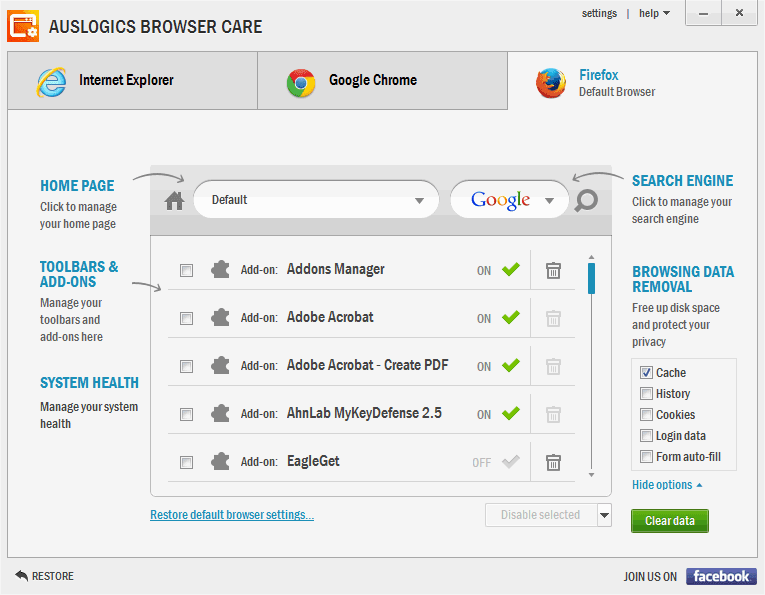
Auslogics Browser Care v4.0.0.0 – 免費又實用的瀏覽器管理工具

Auslogics Browser Care 是一款免費又實用的瀏覽器管理工具,簡單易用,支援 Windows XP/Vista/7/8/10。它會自動偵測所有安裝在電腦中的網頁瀏覽器,讓使用者以「中央指揮部」的單一介面管理 Mozilla Firefox, Google Chrome 和 Internet Explorer 等目前最多人使用的瀏覽器,包括移除不需要的工具列 (toolbars) 和附加元件 (add-ons)、清理快取 (cache) 等、輕易改回被綁架的首頁、微調瀏覽器設定以獲得最佳的效能表現。
這款軟體的主要功能如下:
  • 快速移除或停用不想要的工具列和煩人的附加元件;
  • 管理每個瀏覽器的搜尋引擎;
  • 設定首頁;
  • 輕易改回被綁架的首頁;
  • 清理瀏覽器快取;
  • 清除暫存檔 (temporary files) 和垃圾檔以節省硬碟空間。

The program is a useful free tool to manage all web browsers on your computer. The easy to use interface allows you to clean up and tweak your browsers for optimal performance.
Features:
Quickly remove unwanted toolbars and pesky add-ons
Manage search engines for each browser
Easily change hijacked home pages
Remove temporary and junk files to save space on your hard drive